
Case Study: An FBR-Integrated Digital Invoicing Platform, Live in Production
How SG Technologies built a digital invoicing system connected to FBR in production — real-time submission, validation, QR-coded invoices, ATL checks and inventory.

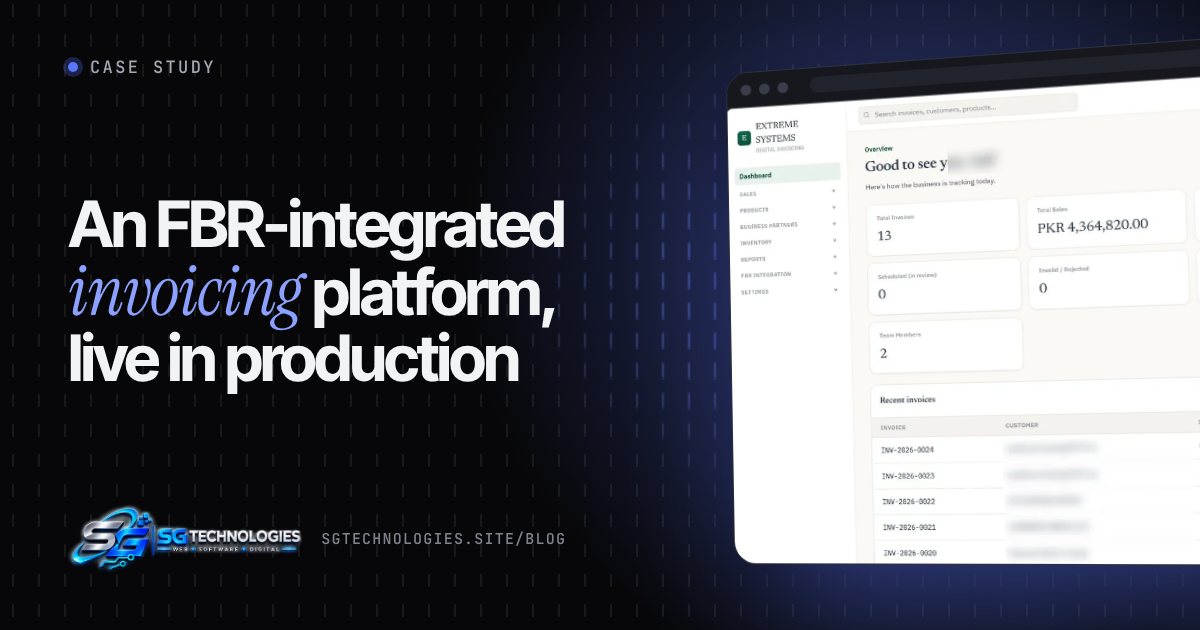
Summary: A Pakistani business needed to issue FBR-compliant sales tax invoices after digital invoicing became mandatory. SG Technologies designed, built and integrated a digital invoicing platform connected to FBR in production. Invoices are created, validated and submitted to FBR in real time; each accepted invoice receives an FBR invoice number and is printed with the FBR Digital Invoicing logo and QR code. Customer names, seller details and invoice numbers are hidden in all screenshots.
The challenge
Under SRO 1413(I)/2025 and the revised deadlines in SRO 1852(I)/2025, every sales tax registered business in Pakistan had to start sending its invoices to FBR in real time (see our complete guide to FBR digital invoicing). The client needed to:
- Issue sales tax invoices that FBR accepts first time, without rejections.
- Keep a reliable record of every submitted invoice and its FBR number.
- Make sure invoices can't be quietly changed after FBR has validated them.
- Manage customers, products and stock in the same system.
- Get a clear picture of sales and tax at any moment.
What we built
A complete web-based invoicing platform, connected to FBR in production.
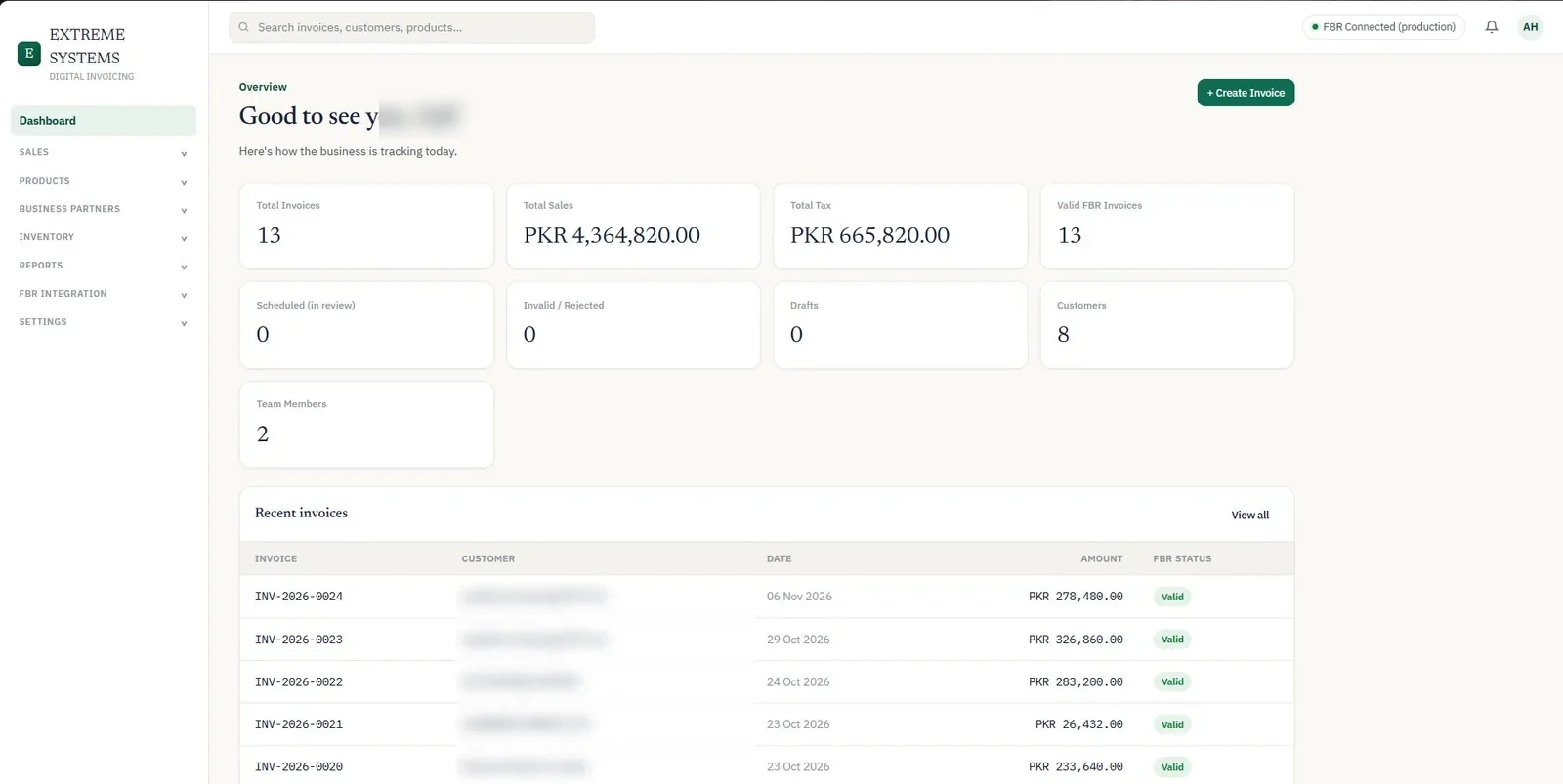
A live sales and tax dashboard
The dashboard shows total invoices, total sales, total tax and valid FBR invoices, plus scheduled (in review), invalid or rejected, drafts, customers and team members — and the most recent invoices with their FBR status. A live "FBR Connected (production)" indicator shows the integration is active.
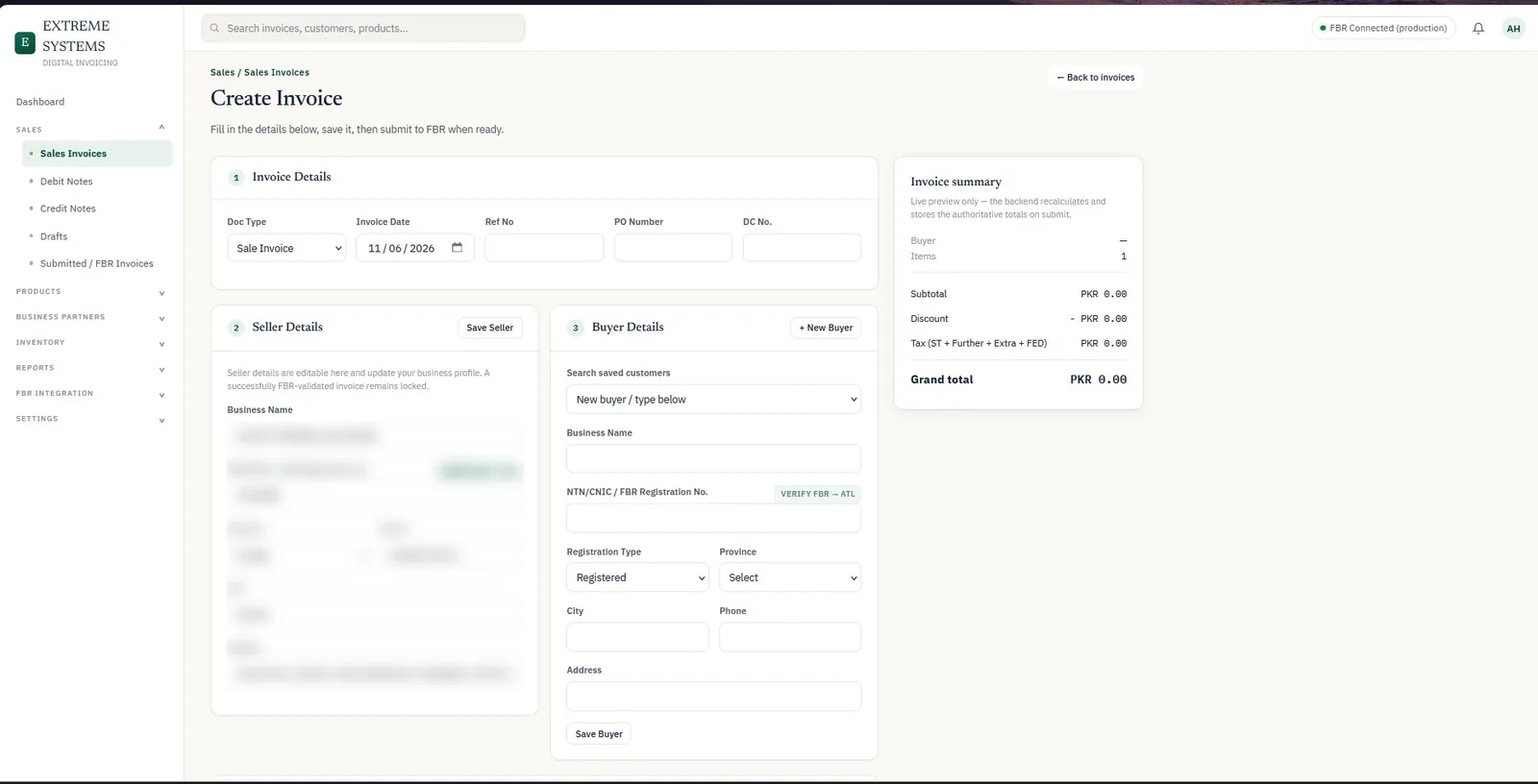
Invoice creation built around FBR's rules
Creating an invoice is a guided, three-step form:
- Invoice details — document type (such as sale invoice), invoice date, reference number, PO number and DC number.
- Seller details — business name, NTN/CNIC, province, phone, city and address, with a "Verify FBR → ATL" check on the registration number. Seller details update the business profile, and an invoice that FBR has validated stays locked.
- Buyer details — search saved customers or add a new buyer, with registration type, province, NTN/CNIC verification and contact details.
A live invoice summary previews subtotal, discount and tax — sales tax, further tax, extra tax and FED — while the back end recalculates and stores the authoritative totals on submission, so the numbers sent to FBR can't be tampered with in the browser.
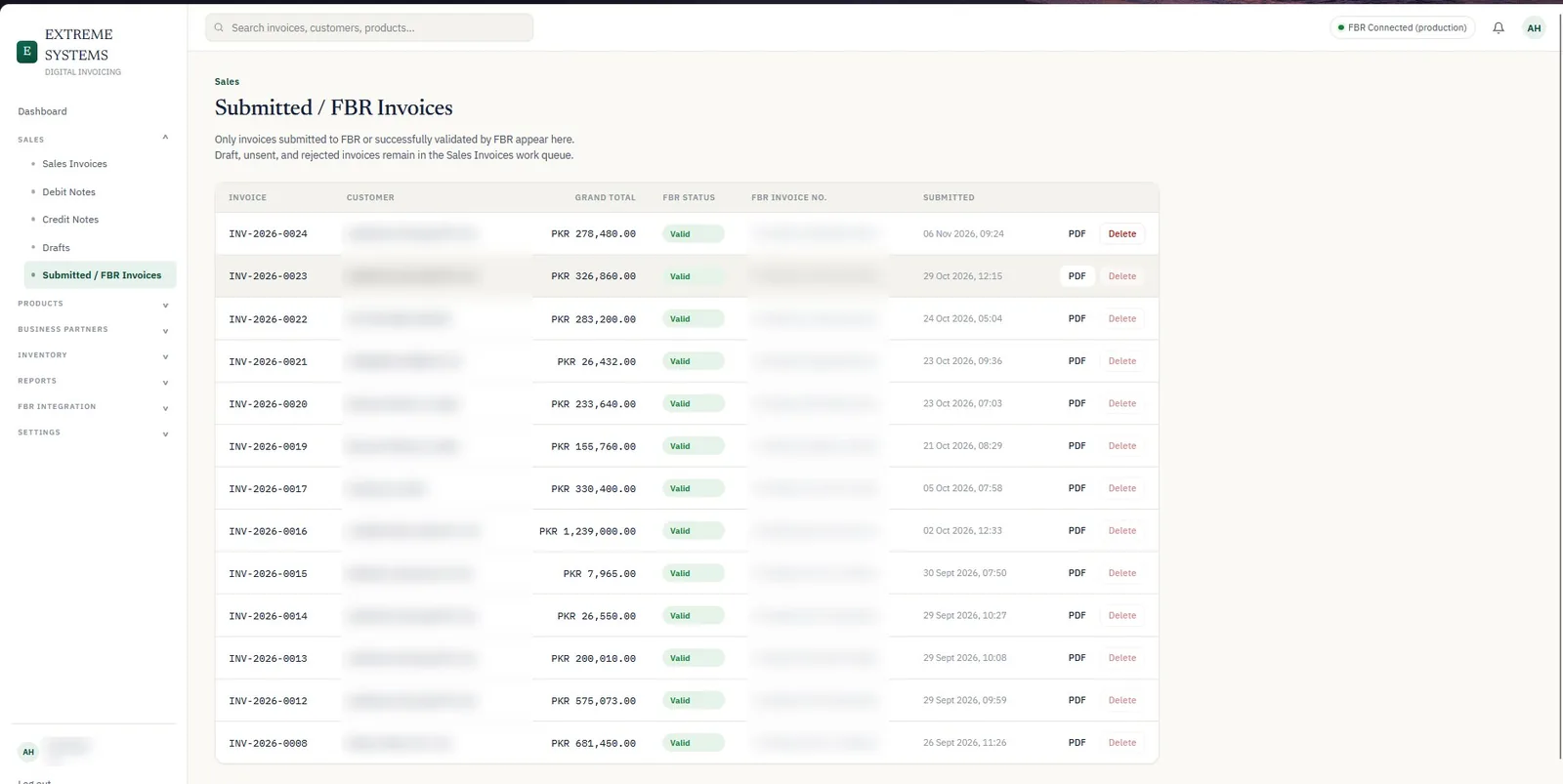
A clean record of everything sent to FBR
The Submitted / FBR Invoices page lists only invoices that were submitted to or validated by FBR — with the grand total, FBR status, FBR invoice number, submission time and a PDF download. Drafts, unsent and rejected invoices stay in a separate work queue, so nothing gets mixed up.
FBR-compliant printed invoices
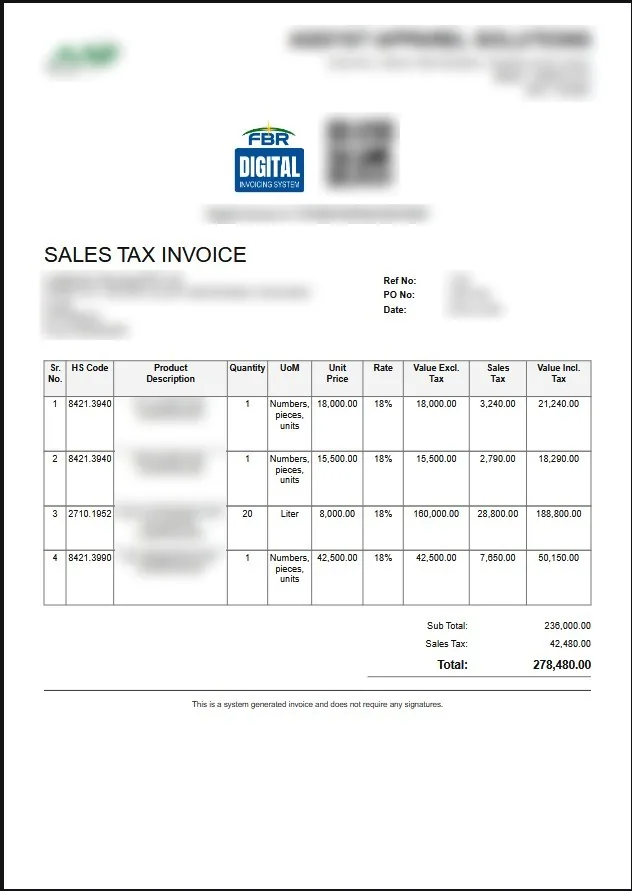
Every validated invoice is generated as a PDF Sales Tax Invoice with the FBR Digital Invoicing System logo, QR code and digital invoice number, plus HS codes, quantities, units of measure, unit prices, tax rates, values excluding and including tax, subtotal, sales tax and total.
Everything else a business needs
- Sales: sales invoices, debit notes, credit notes, drafts and submitted invoices.
- Products and inventory.
- Business partners (customers).
- Reports.
- FBR integration settings and team members with roles.
How the FBR integration works
- Invoice data is validated in the system before submission — registration numbers, provinces, HS codes, units and tax rates.
- The invoice is sent to FBR's digital invoicing system in real time, and FBR's response — status and FBR invoice number — is stored with the invoice.
- Only validated invoices are printed as official sales tax invoices.
- Validated invoices are locked, which fits FBR's rule that genuine mistakes can only be corrected within 72 hours through FBR's system.
The result
- Live in production with FBR, issuing valid digital invoices.
- Every invoice traceable — status, FBR number and submission time in one place.
- No manual tax calculations — totals are computed on the server.
- Sales, tax, customers, products and stock managed in one system.
Need FBR digital invoicing for your business?
Whether you need a complete invoicing system or want to connect your existing software to FBR, we can help. Read the FBR digital invoicing guide or start a project.
Frequently asked questions
Is the SG Technologies invoicing system connected to FBR?
Yes. The platform is connected to FBR's digital invoicing system in production and issues validated invoices with FBR invoice numbers and QR codes.
What does the FBR invoicing system include?
Sales invoices, debit and credit notes, drafts, submitted FBR invoices, customers, products, inventory, reports, team members and FBR integration settings, with a live sales and tax dashboard.
Can invoices be edited after FBR validates them?
No. Validated invoices are locked. FBR only allows genuine mistakes to be corrected within 72 hours through its own system, and later changes need the Commissioner Inland Revenue's approval.
Can SG Technologies connect my existing software to FBR?
Often, yes — through a licensed integrator's API — as long as your software can produce the required invoice data. If it can't, we can build an integration layer or a complete invoicing system.
Related articles
Case Study: Building a Complete HR Management System for an Apparel Manufacturer
How SG Technologies built one HR platform for an apparel manufacturer — attendance, leave, payroll, loans, self-service, analytics and multi-company support.
Read article
How Much Does a Business Website Cost in Pakistan? (2026 Guide)
What really decides the price of a business website or web app in Pakistan — pages, design, features, content and hosting — with real package examples and hidden costs to check.
Read article
HR & Payroll Software in Pakistan: What to Look For in 2026
The modules, Pakistani compliance points (salary tax, EOBI, social security) and questions to ask before you buy or build HR and payroll software.
Read article